
A list stores the task.
HelloYaYa finds the first concrete move.
A calmer planner for neurodivergent minds and anyone who gets stuck starting.
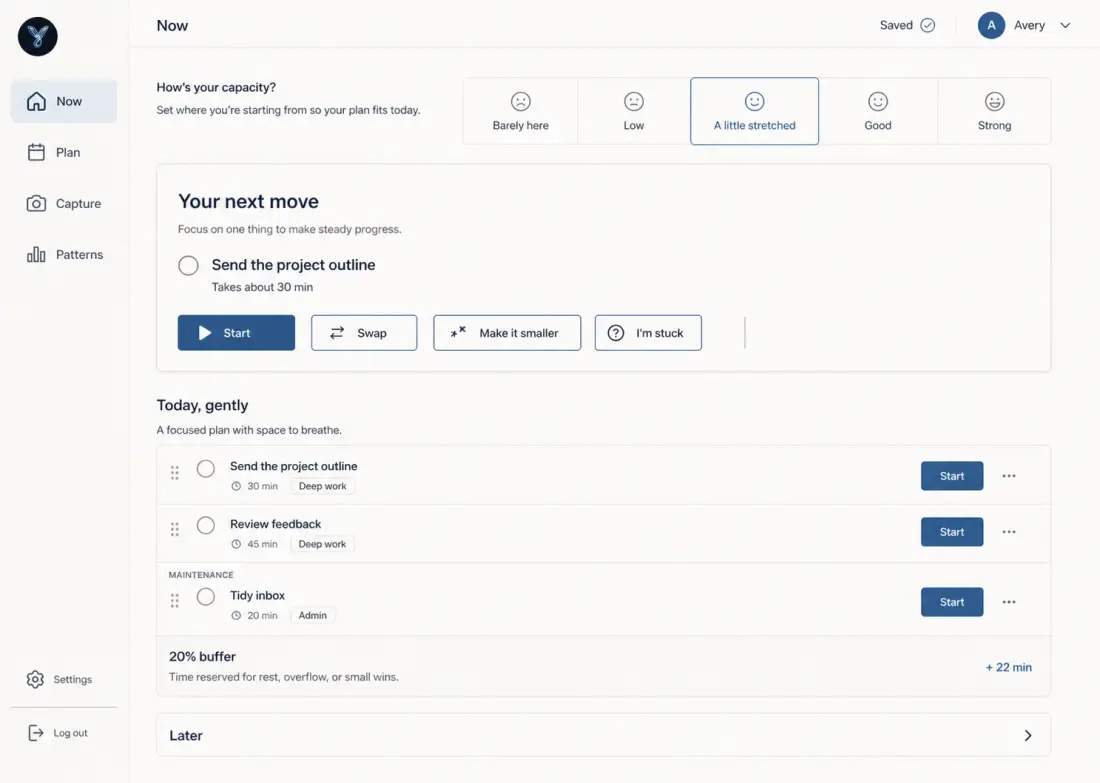
HelloYaYa takes whatever is on your mind, in any order, and turns it into a realistic plan with one next move you can start.
Stuck? It finds a smaller way in. Day fell apart? Reset without guilt.
No streaks. Nothing changes until you approve it.
Why other planners stop working
Real days do not work that way. Energy changes. Meetings run long. A task turns out to be bigger than it looked. HelloYaYa is built for the part where getting started is the hard part.
HelloYaYa finds the first concrete move.
HelloYaYa leaves buffer and plans for the energy you have today.
HelloYaYa asks what is in the way and changes the approach.
How it works
Here is the same morning, from a crowded head to a plan that still fits after the day changes.
Type, paste, or say what is on your mind. It does not need to be in order.
“Email Jordan, the deck still needs the pricing slide, dog food, I keep avoiding the insurance form…”
HelloYaYa sorts it into a plan and picks one move that fits the time and energy you have now.
Open the deck and add a blank pricing slide. About 20 minutes.
Tap I’m stuck, pick what is in the way, and get a smaller way in instead of another reminder.
Too big? Make one piece you can finish in 15 minutes: write the slide title and three prices.
Keep what matters, shrink or move the rest. No overdue pile, and you approve every change.
Keep: email Jordan. Make smaller: the pricing slide, just the title today. Move: the insurance form, to tomorrow.
Try the first minute
See what HelloYaYa does with a messy list before you create an account. What you type is not kept. A next move is saved only if you sign in and choose to keep it.
Start free and keep your plan when you return.
When you're stuck
Tap I'm stuck and pick what is in the way. HelloYaYa changes the move to match.
Not sure where to start?
Find the first thing you can touch or type.
Too big?
Make one piece you can finish in 15 minutes.
Too many choices?
Keep one and set the others aside for now.
Low on energy?
Pick the lowest-energy useful version.
Missing information?
Name what you need and where to look.
Waiting on someone?
Send one short note, then mark it waiting.
Wrong time?
Move it to a better time without losing it.
Feels heavy?
Make a rough first pass only you will see.
When the day changes
A missed window does not turn into a wall of red tasks. Reset keeps your fixed commitments and suggests what to shrink, move, or let go.
The day changed. Let's change the plan.
Pick up prescription
Draft the opening paragraph
Compare insurance plans
Over time
HelloYaYa spots simple patterns from your capacity checks and stuck moments and tells you in plain words. Mark one as not for you, or forget anything you asked it to remember. No streaks, no grades, no comparisons.
Where it works
Works in any browser on your computer, tablet, or phone. Add it to your home screen and it opens like an app.
In testing. Not available yet.
In testing. Not available yet.
Private by design
HelloYaYa does not sell what you write, use it for ads, or use it to train AI.
Pricing
$0 forever
$79.99 per year
or $9.99 month to month
Everyone starts on Free. Your seven-day Plus preview starts on its own after you save your first plan and start a move. No card is needed, and it ends without a charge.
Why HelloYaYa exists
A planner is not much help if it only works when you are already focused, rested, and on schedule. HelloYaYa is built for the other days.
HelloYaYa is named after the founder's wife. That keeps the standard personal: make starting easier without taking away your choices, and never turn a hard day into a score.
No. HelloYaYa is for anyone who finds it hard to get started or to keep a planner going, diagnosed or not.
It keeps your tasks, but its real job is getting you from a full head to a first move, and back on track when you stall or the day changes.
Nothing bad. Reset helps you keep, shrink, move, or drop what is left, and you approve every change.
Some features can suggest steps with AI. You can edit or dismiss every suggestion, and every feature still works without AI. The privacy policy names the AI provider we use.
If you add HelloYaYa to your home screen, it can show your saved next move without a connection. Changes you approve offline, including a plan or Reset you already reviewed, are sent when you reconnect. Making a new plan or Reset suggestion, and AI suggestions, need a connection.
HelloYaYa learns patterns from how your plans go, such as which kinds of starts work for you, and shows them to you in plain words. You can correct, turn off, or delete them. Anything else it keeps about you is saved only after you confirm it. It does not keep a transcript of what you write.
HelloYaYa runs on the web today, in any browser. The iPhone and Apple Watch apps are in testing, and one subscription is designed to cover them when they launch.
You can cancel any time without contacting anyone, and a subscription bought on the web can be paused in Settings. Canceling does not delete your account or anything in Free.
No. It is a planning tool. It does not diagnose, treat, or replace professional care. If something you write suggests you may be in crisis, HelloYaYa shows crisis resources, and that response never comes from AI.
No. HelloYaYa does not sell what you write, use it for ads, or use it to train AI.
Not yet. HelloYaYa is a personal planner for now.
Clear your head. See one move that fits. Change the plan when the day changes.
Clear my headFree to start. No streaks.